day46 TIL
23.06.22
Spring Boot로 RESTful 구현
종속된 자원 표현하기
이제 Article 서비스를 RESTful하게 구현해 보았습니다. 그런데 만약 저희가 이 게시글 서비스에 댓글을 달고 싶다면 어떻게 해야 할까요?
URL & Method 구성
기본적으로 댓글이라는 데이터는 어떤 게시글에 속해 있을 수 밖에 없습니다. 그러면 저희가 만들고자 하는 댓글을 달기 위한 URL도 거기에 맞춰서 작성해줘야 합니다.
즉 어떤 게시글인지에 대한 URL인 /articles/{ariticleId} 부터 시작해서, 해당 자원이 가지고 있는 댓글이라는 의미의 /comments 를 추가해서 URL을 구성해줄 수 있습니다.
- /articles/{articleId}/comments : PK가 aritcleId 인 게시글의 댓글에 대한 작업을 위한 URL
- /articles/{articleId}/comments/{commentId} : PK가 aritcleId 인 게시글의 댓글 중 PK가 commentId 인 댓글에 대한 작업을 위한 URL
여기에 본래 CRUD를 위해 사용하던 Method를 합쳐서 구현해 봅시다.
- 게시글에 댓글 추가: POST /articles/{articleId}/comments
- 게시글 댓글 전체 조회: GET /articles/{articleId}/comments
- 게시글 댓글 수정: PUT /articles/{articleId}/comments/{commentId}
- 게시글 댓글 삭제: DELETE /articles/{articleId}/comments/{commentId}
댓글 단일 조회 기능은 추가하지 않았습니다.
CommentEntity & CommentDto
아직 엔티티와 엔티티 간의 관계를 표현하는 법을 배우지 않았기 때문에, 비록 JPA를 사용중이지만 엔티티에는 일반적인 관계형 데이터베이스 처럼 article_id 를 나타내는 필드를 작성해서 사용합시다.
댓글 기능 구현하기
CommentController의 기능
CommentController
ArticleController 에 메소드를 추가해도 되지만, 점점 메소드가 많아지기 시작함으로, 다른 클래스를 만들고 거기에서 댓글 관련된 URL만 따로 구성할 수 있습니다.
- Magic Number Seven The Magical Number Seven, Plus or Minus Two
- 인간은 7(±2)개의 항목에 대해서만 효과적으로 처리할 수 있다는 인지심리학자 조지 A 밀러의 논문입니다. 개발자들은 여기에서 메소드나 클래스를 작성하는데 있어서 매개변수나 필드를 일곱개 이하로 유지하고자 하는 의견을 제시합니다.
이때 기본적으로 모든 요청 URL이 /articles/{articleId} 로 시작하는 만큼, @RequestMapping 을 클래스에 추가할 때 해당 내용을 반영할 수 있습니다. 만약 내부 메소드에서 articleId 를 활용해야 하는 상황이 온다면, 평소에 하던데로 @PathVariable 어노테이션을 활용하면 됩니다.
CommentController 전체코드
@Slf4j
@RequiredArgsConstructor
@RestController
@RequestMapping("/articles/{articleId}/comments")
public class CommentController {
    private final CommentService service;

    @PostMapping
    public CommentDto create(
            @PathVariable("articleId") Long articleId,
            @RequestBody CommentDto dto
    ) {
        return service.createComment(articleId, dto);
    }

    @GetMapping
    public List<CommentDto> readAll(
            @PathVariable("articleId") Long articleId
    ) {
        return service.readCommentAll(articleId);
    }

    @PutMapping("/{commentId}")
    public CommentDto update(
            @PathVariable("articleId") Long articleId,
            @PathVariable("commentId") Long commentId,
            @RequestBody CommentDto dto
    ) {
        return service.updateComment(articleId, commentId, dto);
    }

    @DeleteMapping("/{commentId}")
    public void delete(
            @PathVariable("articleId") Long articleId,
            @PathVariable("commentId") Long commentId
    ) {
        service.deleteComment(articleId, commentId);
    }
}
1️⃣ 게시글 작성 컨트롤러 ✅
//1. 게시글 작성
    //POST /articles/{articlesId}/comments
    @PostMapping
    public CommentDto create(
            @PathVariable("articleId") Long articleId,
            @RequestBody CommentDto dto
    ) {
        return service.createCommen//TODO 3. 게시글 댓글 수정
    //PUT /articles/{articleId}/comments/{commentsId}

    @PutMapping("/{commentId}")
    public CommentDto update(
            @PathVariable("articleId") Long articleId,
            @PathVariable("commentId") Long commentId,
            @RequestBody CommentDto dto
    ) {
        return service.updateComment(articleId, commentId, dto);
    }(articleId, dto);
    }
2️⃣ 게시글 댓글 전체 조회 컨트롤러
//TODO 2. 게시글 댓글 전체 조회
    //GET /articles/{articleId}/comments
    //반환값 인자 및 필요 어노테이션
    @GetMapping()
    public List<CommentDto> readAll(
            @PathVariable("articleId") Long articleId
    ) {
        return service.readCommentAll(articleId);
    }
3️⃣ 게시글 댓글 수정 컨트롤러
//TODO 3. 게시글 댓글 수정
    //PUT /articles/{articleId}/comments/{commentsId}
    @PutMapping("/{commentId}")
    public CommentDto update(
            @PathVariable("articleId") Long articleId,
            @PathVariable("commentId") Long commentId,
            @RequestBody CommentDto dto
    ) {
        return service.updateComment(articleId, commentId, dto);
    }
4️⃣ 게시글 댓글 삭제 컨트롤러
//TODO 4. 게시글 댓글 삭제
    //DELETE/articles/{articleId}/comments/{commentsId}
    @DeleteMapping("/{commentId")
    public void delete(
            @PathVariable("articleId") Long articleId,
            @PathVariable("commentId") Long commentId,
    ){
        service.deleteComment(articleId, commentId);
    }
컨트롤러의 이름은 CRUD 기능 이름으로 한다.
CommentService 구현
CommentService
댓글을 달기 위한 CommentService 를 구현합니다. 이때 전달받은 articleId 의 값도 활용해서 기능을 구성해 봅시다.
- create : 작성 대상 게시글을 지정하는 용도로 활용할 수 있습니다.
- readAll : 게시글을 기준으로 모든 댓글을 가져올 수 있습니다.
- update : 수정하고자 하는 댓글이 등록된 대상 article의 PK와 전달받은 articleId 가 다를 경우, 수정을 거부할 수 있습니다.
- delete : 삭제하고자 하는 댓글이 등록된 대상 article의 PK와 전달받은 articleId 가 다를 경우, 삭제를 거부할 수 있습니다.
이를 염두에 두면서 CommentService 를 구현해 봅시다. 이때 상황에 따라서 ArticleEntity 의 존재 유무를 판단해야 할 수 있기 때문에, ArticleRepository 도 CommentService 에서 함께 사용합니다.
CommentService 전체코드
@Slf4j
@Service
@RequiredArgsConstructor
public class CommentService {
    private final ArticleRepository articleRepository;
    private final CommentRepository commentRepository;

    public CommentDto createComment(Long articleId, CommentDto dto) {
        Optional<ArticleEntity> optionalArticle
                = articleRepository.findById(articleId);
        if (optionalArticle.isEmpty())
            throw new ResponseStatusException(HttpStatus.NOT_FOUND);
        CommentEntity newComment = new CommentEntity();
        newComment.setWriter(dto.getWriter());
        newComment.setContent(dto.getContent());
        newComment.setArticleId(optionalArticle.get().getId());
        return CommentDto.fromEntity(commentRepository.save(newComment));
    }

    public List<CommentDto> readCommentAll(Long articleId) {
        List<CommentDto> commentList = new ArrayList<>();
        for (CommentEntity entity: commentRepository.findAllByArticleId(articleId)) {
            commentList.add(CommentDto.fromEntity(entity));
        }
        return commentList;
    }

    public CommentDto updateComment(Long articleId, Long commentId, CommentDto dto) {
        Optional<CommentEntity> optionalComment
                = commentRepository.findById(commentId);
        if (optionalComment.isEmpty())
            throw new ResponseStatusException(HttpStatus.NOT_FOUND);
        CommentEntity comment = optionalComment.get();
        if (!articleId.equals(comment.getArticleId()))
            throw new ResponseStatusException(HttpStatus.BAD_REQUEST);

        comment.setContent(dto.getContent());
        comment.setWriter(dto.getWriter());
        return CommentDto.fromEntity(commentRepository.save(comment));
    }

    public void deleteComment(Long articleId, Long commentId) {
        Optional<CommentEntity> optionalComment
                = commentRepository.findById(commentId);
        if (optionalComment.isEmpty())
            throw new ResponseStatusException(HttpStatus.NOT_FOUND);
        CommentEntity comment = optionalComment.get();
        if (!articleId.equals(comment.getArticleId()))
            throw new ResponseStatusException(HttpStatus.BAD_REQUEST);

        commentRepository.deleteById(commentId);
    }
}
1️⃣ 게시글 작성 서비스 ✅
//1. 게시글 작성
public CommentDto createComment(Long articleId, CommentDto dto){
        //articleId를 ID를 가진 ArticleEntity가 존재 하는지?
        if (!articleRepository.existsById(articleId))
            //찾지 못하면 404
            throw new ResponseStatusException(HttpStatus.NOT_FOUND);

        CommentEntity newComment = new CommentEntity();
        newComment.setWriter(dto.getWriter());
        newComment.setArticleId(dto.getArticleId());
        newComment.setContent(dto.getContent());
        newComment = commentRepository.save(newComment);
        return CommentDto.fromEntity(newComment);
    }
2️⃣ 게시글 댓글 전체 조회 서비스
//TODO 게시글 댓글 전체 조회 GET
    //반환 타입 이름 인자
    public List<CommentDto> readCommentAll(Long articleId){
        List<CommentEntity> commentEntities = commentRepository.findAllByArticleId(articleId);
        List<CommentDto> commentList = new ArrayList<>();
        for (CommentEntity entity : commentEntities) {
            commentList.add(CommentDto.fromEntity(entity));
        }
        return commentList;

    }
3️⃣ 게시글 댓글 수정 서비스
//  TODO 게시글 댓글 수정 PUT
    // 수정하고자 하는 댓글이 지정한 게시글에 있는지 확인할 목적으로
    // articleId도 첨부한다.
    public CommentDto updateComment(
            Long articleId,
            Long commentId,
            CommentDto dto
    ) {
        // 요청한 댓글이 존재하는지
        Optional<CommentEntity> optionalComment
                = commentRepository.findById(commentId);
        // 존재하지 않으면 예외 발생
        if (optionalComment.isEmpty())
            throw new ResponseStatusException(HttpStatus.NOT_FOUND);

        // 아니면 로직 진행
        CommentEntity comment = optionalComment.get();

        // 대상 댓글이 대상 게시글의 댓글이 맞는지
        if (!articleId.equals(comment.getArticleId()))
            throw new ResponseStatusException(HttpStatus.BAD_REQUEST);

        comment.setContent(dto.getContent());
        comment.setWriter(dto.getWriter());
        return CommentDto.fromEntity(commentRepository.save(comment));
    }
4️⃣ 게시글 댓글 삭제 서비스
//TODO 게시글 댓글 삭제 DELETE
    //deleteComment() 자유롭게 만들기
    public void deleteComment(Long articleId, Long commentId) {
        Optional<CommentEntity> optionalComment
                = commentRepository.findById(commentId);

        if (optionalComment.isEmpty()) {
            throw new ResponseStatusException(HttpStatus.NOT_FOUND);
        }

        CommentEntity comment = optionalComment.get();
        if (!articleId.equals(comment.getArticleId())) {
            throw new ResponseStatusException(HttpStatus.BAD_REQUEST);
        }

        commentRepository.deleteById(commentId);
    }
`CommentService`
✅ @RequestParam
Query Component이란?
URL의 구성 요소 중 ?(물음표) 뒤에 요소입니다.
- 요구하는 자원에 대한 동적인 조건을 전달하는 용도로 사용
- 페이지, 검색 등
- ?(물음표) 뒤에 key(인자이름) = value(값) 형식으로 활용, 각 인자는 & 로 구분
- query : keyword
- limit : 20
✅ @RequestParam
Spring의 RequestMapping 메소드에서는 @RequestParam을 이용해 Query의 인자를 받아올 수 있다.

- QueryController 클래스 생성
imp
@Slf4j
@RestController
public class QueryController {
    //GET /path?query=keyword&limit=20
    @GetMapping("/path")
    public Map<String, Object> queryParams(
            @RequestParam("query") String query,
            @RequestParam("limit") Integer limit
    ){
        log.info("query = " + query);
        log.info("limit = " + limit);

        Map<String,Object> response = new HashMap<>();
        response.put("query", query);
        response.put("limit", limit);
        return response;
    }
}
<aside> 💡 defaultValue: 기본값 설정
required: 필수 포함 여부
</aside>


✅ Pagisation
조회할 데이터의 갯수가 많을 때, 조회 되는 데이터의 갯수를 한정 시켜 페이지 단위로 나누는 기법으로 Paiging이라고 불린다.

- 조회할 데이터의 갯수가 줄어들기 때문에 성능 향상을 꾀할 수 있습니다.
- 사용자가 데이터를 확인하는 과정에서 확인해야 하는 데이터를 줄여 UX가 향상됩니다.
✅ JPA Pagination
💡 목표 : aritcles중 클라이언트의 조건에 따라 스무 개씩 나누어서 제공하기
1 ~ 20 / 21~ 40 / 41 ~ 60로 정렬
1️⃣ JpaRepository 를 이용하여 받아올 수 있는 데이터의 갯수 조절하기
- Query Method를 활용해서 가져올 데이터의 갯수를 한정시켜 조회
- ArticleRepository 인터페이스
public interface ArticleRepository
        extends JpaRepository<ArticleEntity, Long> {
    // ID가 큰 순서대로 최상위 20개 정렬
    List<ArticleEntity> findTop20ByOrderByIdDesc();
    // ID가 특정 값보다 작은 데이터 중 큰 순서대로 최상위 20개 정렬
    List<ArticleEntity> findTop20ByIdLessThanOrderByIdDesc(Long id);
}
💡 주의) 메소드 이름을 정하는 규칙을 지켜야 실행이 된다.
findTop20ByOrderByIdDesc();
// ID가 큰 순서대로 최상위 20개 정렬
findTop20ByIdLessThanOrderByIdDesc(Long id);
// ID가 특정 값보다 작은 데이터 중 큰 순서대로 최상위 20개 정렬
📌 JpaRepository 를 이용하여 조회 해보기
- ArticleService 클래스
//1번 방식 ArrayList 사용
public List<ArticleDto> readArticlePaged(){
        //JPA Query Method 방식(비추)
        List<ArticleDto> articleDtoList =
                new ArrayList<>();
        for (ArticleEntity entity : repository.findTop20ByOrderByIdDesc()){
            articleDtoList.add(ArticleDto.fromEntity(entity));
        }
        return articleDtoList;
    }
- ArticleController 클래스
//GET /articles/page-test
    @GetMapping("/page-test")
    public List<ArticleDto> readPageTest(){
        return service.readArticlePaged();
    }


➡️ 이 방법을 사용할 경우 조회할 기준이 되는 ID를 클라이언트가 제공하거나, 클라이언트가 페이지 번호를 전달 할 경우 어떤 식으로든 백엔드에서 기준점을 만들어야해서 추천하지 않는 방법입니다.
2️⃣ pageable 객체 방법
📌 pageable 사용 하기
PageReqeust.of()라는 메서드에 page, size, sort를 원하는대로 파라미터로 넘겨서 생성하면 됩니다.
📌 사용 방법
Pageable pageable = PageRequest.*of*(0, 20);
➡️ 20개씩 데이터를 나눌 때 0번 페이지를 달라고 요청하는 기준 Pageable

Page<ArticleEntity> articleEntityPage = repository.findAll(pageable);
➡️ 객체를 findAll()메소드에 인자로 전달하면 Page<ArticleEntity> 객체를 반환해줍니다.
📌 사용 예시
Page<Entity> pleaseGiveMePages(int page, int size) {
	Pageable pageable = PageRequest.of(page,size);
    	Page<Entiy> page = entityRepository.findAll(pageable);
        return page;
}
- ArticleService에 사용해보기
//pageable 사용 방식
public Page<ArticleEntity>  readArticlePaged(){
        //pagingAndSortingRepository 메소드에 전달하는 용도
        //조회하고 싶은 페이지의 정보를 담는 객체
        //20개씩 데이터를 나눌 때 0번 페이지를 달라고 요청하는 기준 Pageable
        Pageable pageable = PageRequest.of(0, 20);
        Page<ArticleEntity> articleEntityPage = repository.findAll(pageable);
        return articleEntityPage;
    }
- ArticleController
//GET /articles/page-test
    @GetMapping("/page-test")
    public Page<ArticleEntity> readPageTest(){
        return service.readArticlePaged();
    }
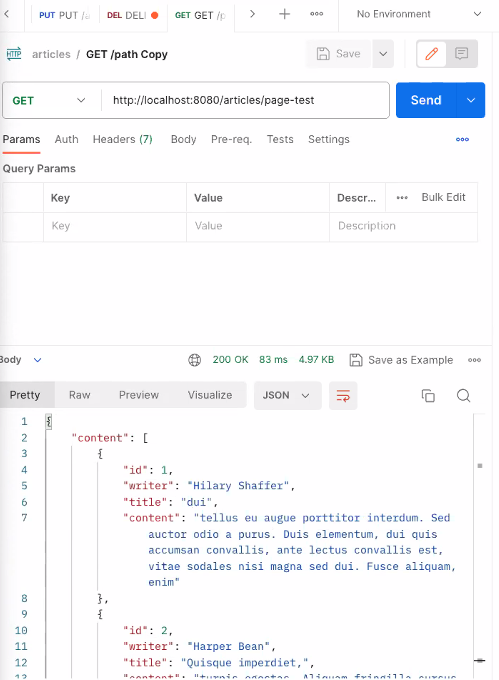
- 실행결과
✅ Search
- ArticleService
public Page<ArticleDto> readArticlePaged() {
        // PagingAndSortingRepository 메소드에 전달하는 용도
        // 조회하고 싶은 페이지의 정보를 담는 객체
        // 20개씩 데이터를 나눌때 0번 페이지를 달라고 요청하는 Pageable
        Pageable pageable = PageRequest.of(
                0, 20, Sort.by("id").descending());
        Page<ArticleEntity> articleEntityPage
                = repository.findAll(pageable);
        // map: 전달받은 함수를 각 원소에 인자로 전달한 결과를
        // 다시 모아서 Stream으로
        // Page.map: 전달받은 함수를 각 원소에 인자로 전달한 결과를
        // 다시 모아서 Page로
        Page<ArticleDto> articleDtoPage
                = articleEntityPage.map(ArticleDto::fromEntity);
       return articleDtoPage;
    }
- 페이지 단위로 실행 되는 걸 확인 할 수 있다.

- ArticleController
defaultValue = “ 문자열로 할당해야한다. ”
@GetMapping
    public Page<ArticleDto> readAll(
            @RequestParam(value = "page", defaultValue = "0") Integer page,
            @RequestParam(value = "limit", defaultValue = "20") Integer limit
    ) {
        return service.readArticlePaged(page, limit);
    }
- ArticleService
public Page<ArticleDto> readArticlePaged(
            Integer pageNumber, Integer pageSize
    ) {
        // PagingAndSortingRepository 메소드에 전달하는 용도
        // 조회하고 싶은 페이지의 정보를 담는 객체
        // 20개씩 데이터를 나눌때 0번 페이지를 달라고 요청하는 Pageable
        Pageable pageable = PageRequest.of(
                pageNumber, pageSize, Sort.by("id").descending());
        Page<ArticleEntity> articleEntityPage
                = repository.findAll(pageable);
        // map: 전달받은 함수를 각 원소에 인자로 전달한 결과를
        // 다시 모아서 Stream으로
        // Page.map: 전달받은 함수를 각 원소에 인자로 전달한 결과를
        // 다시 모아서 Page로
        Page<ArticleDto> articleDtoPage
                = articleEntityPage.map(ArticleDto::fromEntity);
        return articleDtoPage;
    }
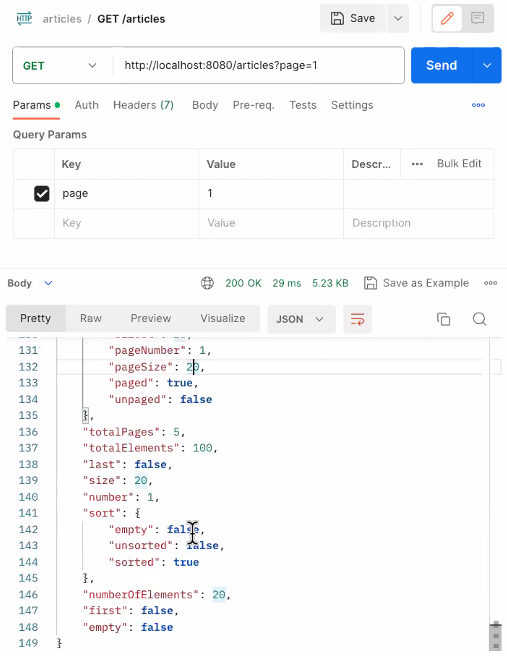
실행결과

Search
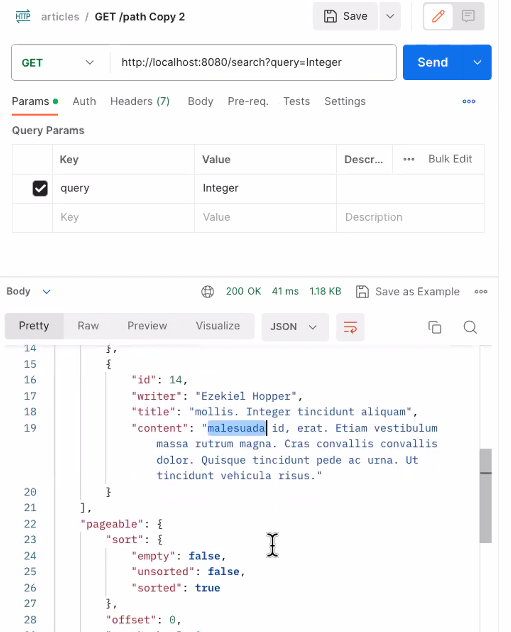
간단한 검색기능은 WHERE절을 활용하여 구성할 수 있습니다.
JPA Query Method
JpaRepository에 Query Method를 추가하는 방식으로 쉽게 구현할 수 있습니다.
List<ArticleEntity> findAllByTitleContains(String title);
JpaRepository를 사용하면, Query Method에 Pageable 인자를 추가할 수 있습니다.
이 방법을 사용하면 검색 결과를 페이지 단위로 나눠서 결과를 받을 수 있습니다.
Page<ArticleEntity> findAllByTitleContains(String title, Pageable pageable);
반환값은 Page와 List 둘다 사용 가능합니다.
실습
QueryController 전체코드
@GetMapping("/path")
    public Map<String, Object> queryParam(@RequestParam(value = "query", defaultValue = "hello") String query,
                                          @RequestParam(value = "limit", required = false) Integer limit) {
        log.info("query = {}", query);
        log.info("limit = {}", limit);

        Map<String, Object> response = new HashMap<>();
        response.put("query", query);
        response.put("limit", limit);

        return response;
    }

    @GetMapping("/serch")
    public Page<ArticleDto> search(
            @RequestParam("query") String query, // 검색어는 필수
            @RequestParam(value = "page", defaultValue = "0")
            Integer pageNumber
    ){

        return service.search(query.pageNumber);
    }
}
ArticleRepository 전체코드
public interface ArticleRepository
        extends JpaRepository<ArticleEntity, Long> {
    // ID가 큰 순서대로 최상위 20개 정렬
    List<ArticleEntity> findTop20ByOrderByIdDesc();
    // ID가 특정 값보다 작은 데이터 중 큰 순서대로 최상위 20개 정렬
    List<ArticleEntity> findTop20ByIdLessThanOrderByIdDesc(Long id);

    //제목에 title이 들어가는 article 검사
    Page<ArticleEntity> findAllByTitleContains(String title, Pageable pageable);
}
ArticleService 전체코드
import com.example.likelion.week10day3.dto.ArticleDto;
import com.example.likelion.week10day3.entity.ArticleEntity;
import com.example.likelion.week10day3.repository.ArticleRepository;
import lombok.RequiredArgsConstructor;
import org.springframework.data.domain.Page;
import org.springframework.data.domain.PageRequest;
import org.springframework.data.domain.Pageable;
import org.springframework.data.domain.Sort;
import org.springframework.http.HttpStatus;
import org.springframework.stereotype.Service;
import org.springframework.web.server.ResponseStatusException;

import java.util.ArrayList;
import java.util.List;
import java.util.Optional;

@Service
@RequiredArgsConstructor
public class ArticleService {

    private final ArticleRepository repository;

    // Spring Data Jpa 쿼리 메소드로 페이지 조회하는것은 좋지않은 방법
//    public List<ArticleDto> readArticlePaged() {
//        List<ArticleDto> articleDtoList = new ArrayList<>();
//        for (ArticleEntity entity : repository.findTop20ByOrderByIdDesc()) {
//            articleDtoList.add(ArticleDto.fromEntity(entity));
//        }
//        return articleDtoList;
//    }

//    public List<ArticleDto> readArticlePaged() {
//        // 조회하고 싶은 페이지의 정보를 담는 객체
//        // 20개씩 데이터를 나눌때 0번 페이지를 달라고 요청하는 Pageable
//        Pageable pageable = PageRequest.of(0, 20, Sort.by("id").descending());
//
//        Page<ArticleEntity> articleEntityPage
//                = repository.findAll(pageable);
//
//        List<ArticleDto> articleDtoList = new ArrayList<>();
//        for (ArticleEntity entity : articleEntityPage) {
//            articleDtoList.add(ArticleDto.fromEntity(entity));
//        }
//
//        return articleDtoList;
//    }

    public Page<ArticleDto> readArticlePaged(
            Integer pageNumber, Integer pageSize
    ) {
        Pageable pageable = PageRequest.of(pageNumber, pageSize, Sort.by("id").descending());

        Page<ArticleEntity> articleEntityPage
                = repository.findAll(pageable);

        // map : 전달받은 함수를 각 원소에 인자로 전달된 결과를
        // 다시 모와서 Stream 객체로

        Page<ArticleDto> articleDtoPage
                = articleEntityPage.map(ArticleDto::fromEntity);

        return articleDtoPage;
    }

    public Page<ArticleDto> search (
            String query, Integer pageNumber
    ){
        Pageable pageable
                = PageRequest.of(pageNumber, 20, Sort.by("id").descending());

        Page<ArticleEntity> articleEntityPage
                = repository.findAll(pageable);

        return repository.findAllByTitleContent(query, pageable).map(ArticleDto::fromEntity);
    }
}
실행 결과